|
Latest News
BatchAudio Command Line v1.0 has been released! |
| Home |
| Products |
| Order |
| Downloads |
| Support |
| Contact Us |
Products |
|
BatchAudio allows any bit depth to be specified up to 32 bits with storage in either 16, 24 or 32 bit fixed point containers. Virtually any sampling rate may be specified. All common rates such as 8kHz, 11.025KHz, 16kHz, 22.050kHz, 32kHz, 44.100kHz, 48kHz, 88.200kHz, 96kHz and 192kHz are supported. Bit depth and rate conversion ratios are calculated on a per file basis, allowing normalisation of disparate bit depths and rates to a single bit depth and rate in one batch process. Currently only 16, 24 and 32 bit fixed point PCM input formats is supported. Sample-Rate Conversion specification
Bit-Depth Conversion specification
All products in the BatchAudio family share the same core functionality and the same core quality. In general the only difference is in the interface that they provide. |
BatchAudio |
|
In first release BatchAudio will fulfil most user's needs and for commercial use you will need to register your copy. For more information see the our orders page. BatchAudio works by allowing you to populate a list of all files you wish to convert. You simply choose the conversion settings you require, possibly opting to leave the original bit depth or sample rate unchanged, select files from the list to convert, then hit the Convert button. It couldn't be easier! All converted files are placed either in a folder relative to each original file, or all placed into a single storage folder.
|
BatchAudio Command Line |
|
All the settings available in the Windows version are available here too, including the option to leave the original bit depth or sampling rate. Any number of files may be converted and the progress of each conversion is displayed on the console. Sensible default command options mean you do not need to remember a complex list of settings. In general only the output location and input files need to be specified in addition to the desired sampling rate or bit depth (or both). Currently BatchAudio Command Line is available as a Windows DOS console application but will also be available for Linux in the next release. |
BatchAudio Library |
|
If you require this service then please contact our BatchAudio Library/SDK sales department who they will be happy to try to assist you. We also offer the possibility to customise the core functionality to suit individual customer's needs.
|
 BatchAudio
is designed to offer leading quality sample rate and bit depth
conversion.
BatchAudio
is designed to offer leading quality sample rate and bit depth
conversion.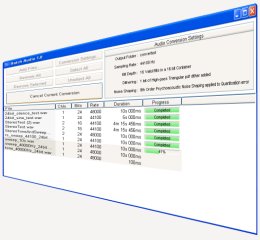 BatchAudio
runs under Windows but future releases will run under Windows,
Linux and MacOSX. The software is currently in its first release
and you are welcome to download and try it for Personal (Non-Commercial)
Use.
BatchAudio
runs under Windows but future releases will run under Windows,
Linux and MacOSX. The software is currently in its first release
and you are welcome to download and try it for Personal (Non-Commercial)
Use.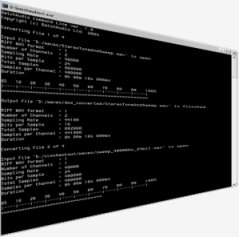 BatchAudio
Command Line offers a command line interface that provides the
same core functionality of the Windows application. A command line
interface allows the user to script batch processing if that is
required.
BatchAudio
Command Line offers a command line interface that provides the
same core functionality of the Windows application. A command line
interface allows the user to script batch processing if that is
required. Some
users will want to integrate the functionality of BatchAudio
directly into their own software. BatchAudio provides library
files to support this need along with a simple SDK to help get you
started.
Some
users will want to integrate the functionality of BatchAudio
directly into their own software. BatchAudio provides library
files to support this need along with a simple SDK to help get you
started.